Intro
In the previous step we made the application a little more useful by introducing a very simple form of retrieval. Instead of sending every document to the LLM, we split the documents into chunks and tried to find the ones that looked relevant to the question.
But there is an obvious problem with that approach which is we were essentially just counting words. That works when the question and the document use the same terminology, but it breaks very easily when the same idea is expressed differently.
Imagine that one of our documents says:
This is where embeddings become useful.
Authentication uses JWT tokens.
And the user asks:
How do users log into the system?
There isn’t much overlap between the above two sentences if we look at the actual words. A simple keyword search could easily miss the relevant document even though a human would immediately understand that they are talking about the same thing.
This is where embeddings become useful.
As usual, here is the code for what we are about to do: https://github.com/genoiucosmin/AIApp1/tree/Step3
Moving from words to meaning
An embedding is a numerical representation of text. Instead of treating a sentence simply as a collection of words, an embedding model converts it into a vector containing many numerical values that capture aspects of the text’s meaning.
For example, conceptually we might have something like:
"Authentication uses JWT tokens." that will be "translated" to [0.0123, -0.3345, 0.1821, ...]
The actual vector is much larger than this, but the important part is the idea. We can now represent both documents and questions in the same mathematical space. So when the application starts, it takes each document chunk and generates an embedding for it.
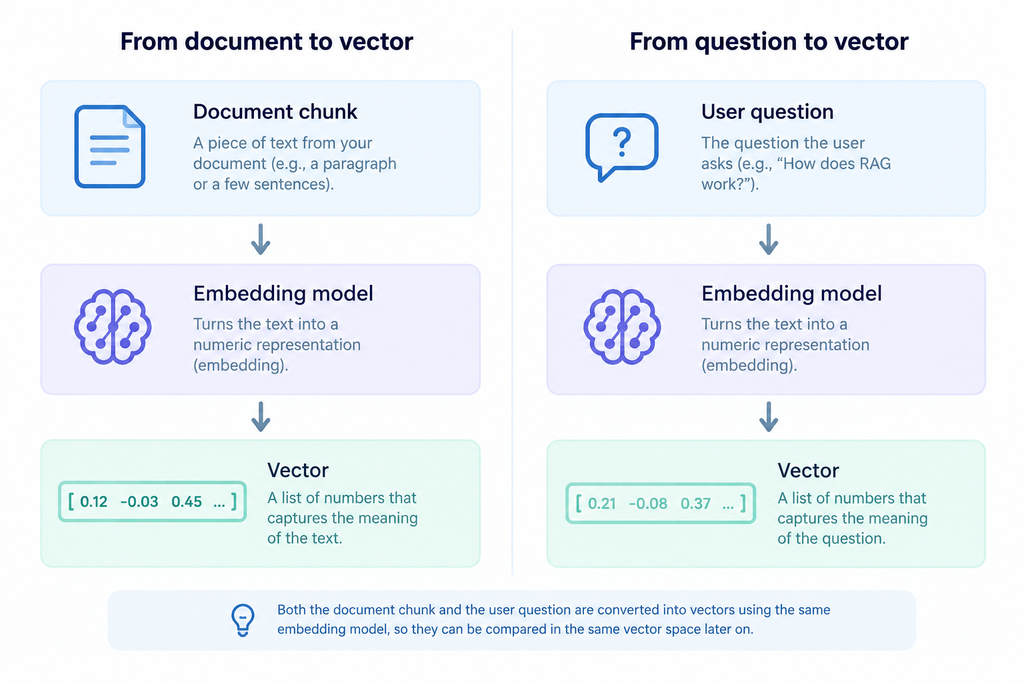
Now we have two vectors that we can compare.
The interesting part is that semantically similar pieces of text should produce vectors that are relatively close to each other, even when they don’t use exactly the same words. This is the big difference from the previous implementation.
Comparing vectors
For this first implementation I used cosine similarity. The idea is fairly simple. We don’t primarily care about the absolute size of the vectors. We care about the angle between them. If two vectors point in a similar direction, their cosine similarity is high. If they point in very different directions, the similarity is lower.
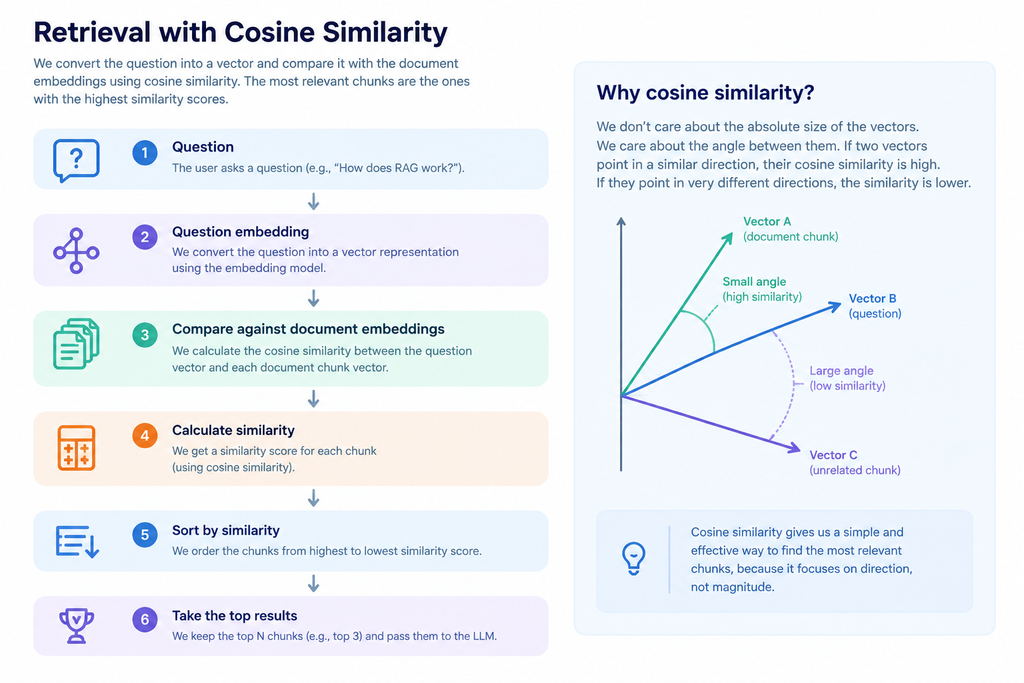
The actual search code is quite small:
public async Task<IReadOnlyList<EmbeddedChunk>> SearchAsync(
    string question,
    int top = 3)
{
 //we build embeddings for the documents if we haven't done so yet
    if (_index == null)
        await BuildAsync();

//we build an ebedding for the question
    var queryVector =
        await _embedder.CreateEmbeddingAsync(question);

//we compare to the document embeddings (each chuck has its own vector) with the question embedding to find the most //relevant chunks
    return _index!
        .Select(c => new
        {
            Chunk = c,
            Score = VectorMath.CosineSimilarity(
                queryVector,
                c.Vector)
        })
        .OrderByDescending(x => x.Score)
        .Take(top)
        .Select(x => x.Chunk)
        .ToList();
}
There are two important things happening here.
- First, the question is converted into an embedding. Then that vector is compared with every document chunk in our in-memory index.
- Then the chunks are ordered by their similarity score and we keep the top three.
This means that the LLM no longer receives all of our documents. It receives the pieces that our retrieval step believes are most relevant.
Building the index
The index is created by taking the chunks from the document service and generating an embedding for each one:
public async Task BuildAsync()
{
    if (_index != null)
        return;

    var chunks = _docs.LoadChunks();
    _index = new List<EmbeddedChunk>();

    foreach (var chunk in chunks)
    {
        var vector =
            await _embedder.CreateEmbeddingAsync(chunk.Content);

        _index.Add(new EmbeddedChunk(
            chunk.Source,
            chunk.Content,
            vector));
    }
}
For this project we are keeping the vectors in memory. That is obviously not how we would build a large production system, but it makes the underlying mechanism much easier to understand. There is no Pinecone, Weaviate, Elasticsearch or other vector database hiding the details from us so we can actually see what a vector index is doing.
Giving the retrieved information to the LLM
The final part of the process is still very similar to what we had in the previous step. The difference is that now it is the AiService that asks the EmbeddingIndex for relevant chunks first:
var relevant = await _index.SearchAsync(question);

var context = string.Join(
    "\n\n",
    relevant.Select(c =>
        $"Source: {c.Source}\n{c.Content}"));
That context is then included in the system prompt:
var systemPrompt =
    "You are an assistant that answers ONLY using the provided context.\n" +
    "If the answer is not present, say you don't know.\n\n" +
    "Context:\n" + context;

return await _ai.AskAsync(systemPrompt, question);
So the complete flow has now become:
Get the context: User question -> Create question embedding -> Semantic search -> Top 3 relevant chunks

Get the answer: Build context -> Send context + question to LLM -> Generate answer
This is the basic idea behind Retrieval-Augmented Generation, or RAG.
The important distinction is that the LLM itself isn’t searching the documents. Our application performs the retrieval first and then gives the retrieved information to the LLM as context.
Why this is better than keyword matching
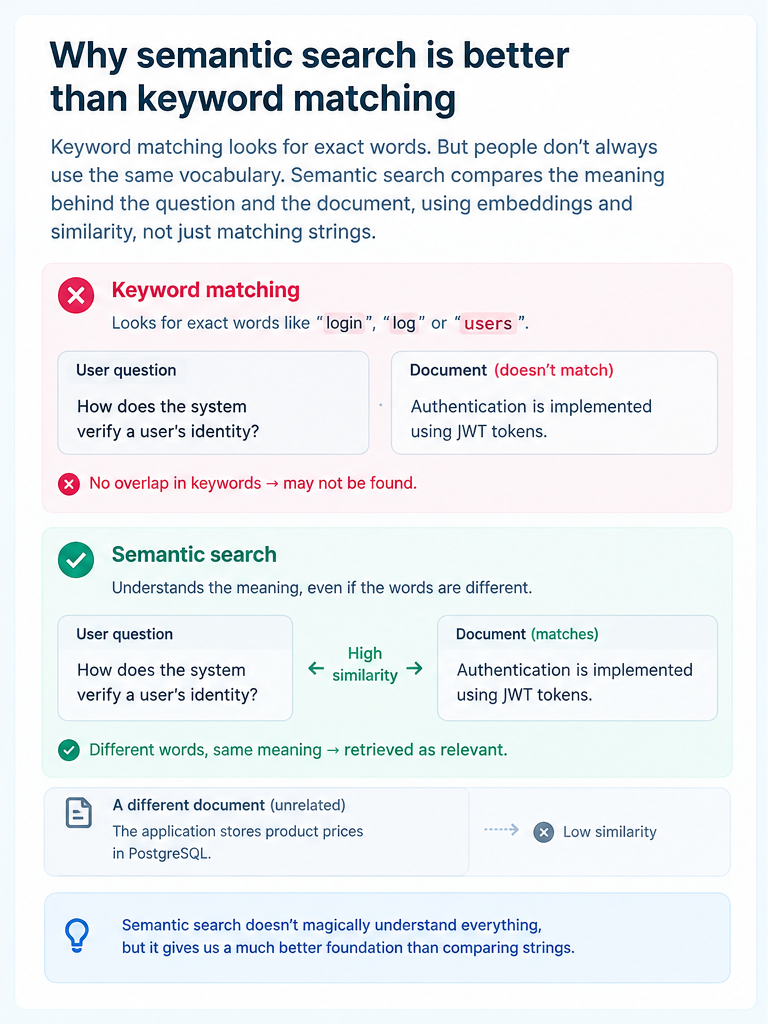
Let’s go back to the authentication example we started with. With keyword matching, the application might look for words such as login, log or users. But the document might talk about authentication, JWT, tokens or identity instead.
Semantic search gives us a way to search for the meaning of the question rather than requiring the exact same vocabulary to appear in the document.
That doesn’t mean embeddings magically understand everything, and it certainly doesn’t mean semantic search will always return the correct result, but it just gives us a much better foundation than comparing strings.
What we’ve actually built
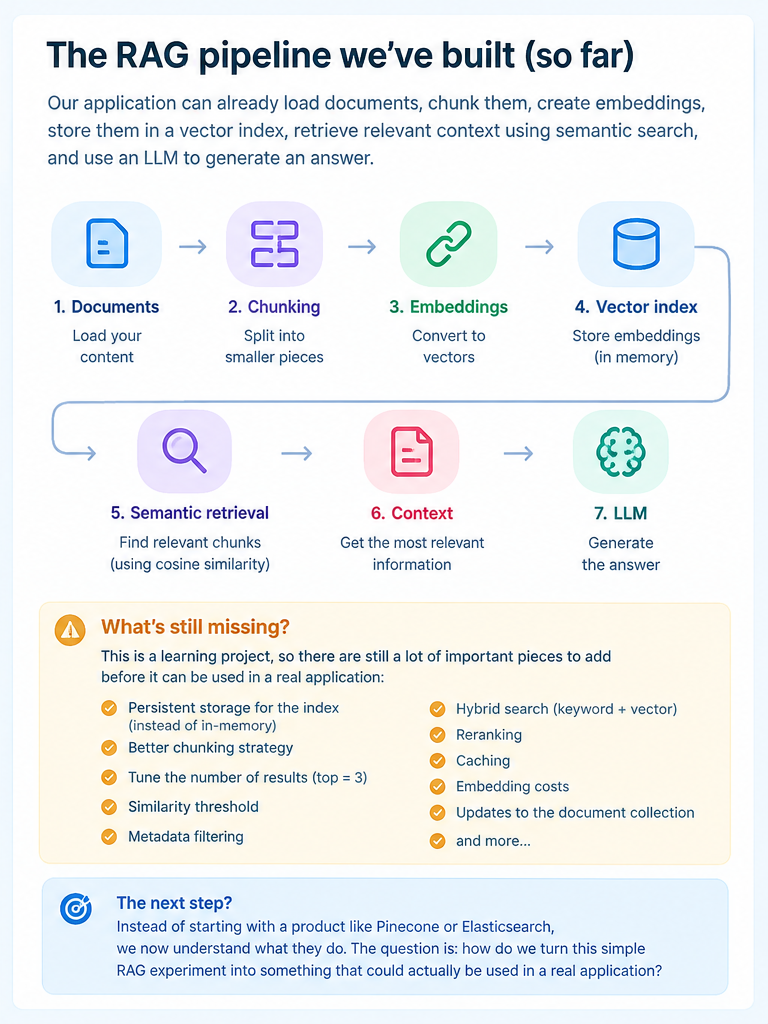
At this point the application contains the main pieces of a simple RAG pipeline: documents, chunking (which we learned in step 2), embeddings, vector index, semantic retrieval and getting relevant context (which we learned in this lesson) and using an LLM to get the answer.
But there are still plenty of things missing.
The vectors are stored in memory only. The index is rebuilt by the application rather than being a persistent database. The chunking strategy is very basic, we always take exactly three results, and we don’t yet have a proper way of evaluating whether the retrieved chunks are actually good.
A production system would also need to think about metadata filtering, hybrid search, similarity thresholds, reranking, caching, embedding costs, updates to the document collection and many other concerns (which we will tackle in the following lessons).
But I think this is an important point in the project because I can now see what the vector database products are actually doing for us. Instead of starting with a product such as Pinecone or Elasticsearch and learning how to call its API, we have built a very small version of the underlying idea.
That makes the next step much more interesting. The question is no longer “How do I make an LLM answer questions about my documents?” but “How do I turn this simple RAG experiment into something that could actually be used in a real application?“
Few things to make sure you understood this lesson:
Why cosine similarity?
We now have two vectors: one representing the user’s question and one representing each document chunk. We need a way to compare them.
For this implementation I used cosine similarity. It measures how similar the direction of two vectors is. If the vectors point in a similar direction, their cosine similarity is high; if they are very different, the score is lower.
For example, if the application has this document: “Authentication is implemented using JWT tokens.” and the user asks: “How does the system verify a user’s identity?”, the actual words are quite different, but the meanings are related. Their embeddings should therefore be relatively close in the vector space, producing a relatively high cosine similarity.
On the other hand, a completely unrelated document such as “The application stores product prices in PostgreSQL.” should have a much lower similarity to the authentication question.
We don’t need to think of cosine similarity as some AI-specific magic. At this level, it is simply the similarity function we’re using to compare the question vector with the document vectors.
Why do we cache the index?
There is another important detail in the implementation: when the application builds the index, it takes every document chunk and sends it through the embedding model. Those embeddings are then stored in memory.
We don’t want to repeat that process every time somebody asks a question.
Imagine we have 1,000 chunks: Application will start 1,000 document chunks that will create 1,000 embeddings and an in-memory index. A user can then ask many questions without regenerating all those document embeddings. For each question, we only need to generate one new embedding for the question and compare it against the embeddings we already have:
This saves both time and API calls. The obvious limitation is that our index is only in memory. If the application restarts, we lose it and have to build it again. That’s acceptable for this experiment, but it wouldn’t be a good solution for a larger production application.
A production system would normally persist the embeddings in some kind of vector store or search engine, which is one of the things we’ll eventually explore in the next lessons.
What does top 3 actually mean?
The search method currently has a parameter (top 3). This simply means that after comparing the question with all the document chunks, we sort them by similarity and keep only the three highest-scoring results to pass to the LLM.
In a real application, the number of retrieved chunks would be something we would need to tune. Retrieving too few chunks can mean that we miss important information. Retrieving too many increases token usage, latency and cost, and can even make the model’s answer worse by giving it too much irrelevant context.
A more advanced system might also use a similarity threshold, so that a chunk is only considered relevant if its similarity score is high enough.
What about the cost of embeddings?
There are actually two different costs to think about:
- the cost of embedding the documents: if I have 1,000 chunks, we need to generate embeddings for those chunks when we build the index. Once those embeddings exist, however, we can reuse them for many questions.
- the cost of embedding user queries.
So document embeddings are mainly an indexing cost because once those embeddings exist we can reuse them for many questions, while query embeddings are a per-query cost.
This is another reason why rebuilding the entire document index for every question would be a terrible design.
What happens when the number of documents becomes very large?
Our implementation currently compares the question vector with every vector in the index. For a few hundred or even a few thousand chunks, that’s perfectly reasonable for a learning project.
But in real production scenarios where there are millions of chunks, we wouldn’t necessarily want to perform a brute-force comparison against every vector for every question.
This is where products such as Pinecone, Weaviate, Elasticsearch, Azure AI Search and other vector search technologies become relevant. They provide persistent storage and optimized ways of finding vectors that are close to the query without us having to implement everything ourselves.
Summary: how does all this information help you in an interview?
After this lesson, you should be able to explain the RAG pipeline without relying on the code: Documents – Chunking – Embeddings – Vector index – User question – Question embedding – Similarity search – Top relevant chunks – Context – LLM
Q: “Why embeddings?”
- Because they allow us to search based on semantic similarity rather than requiring exact keyword matches.
Q: “Why cosine similarity?”
- because it helps comparing embedding vectors based on their directional similarity.
Q: “Why cache the embeddings?”
- because document embeddings don’t change for every user query, so generating them once and reusing them avoids unnecessary API calls, latency and cost.
Q: “Why top 3?”
- it is simply the retrieval depth chosen for this experiment, but in production, we’d tune the number of results and potentially combine it with similarity thresholds or reranking.
Q: “Is this production-ready RAG?”, the honest answer is no.
It’s a deliberately small implementation that demonstrates the core mechanism. A production system would need persistent storage, better chunking, metadata, filtering, evaluation, monitoring, security and probably a more sophisticated retrieval strategy.
But that’s exactly what we wanted from this iteration. We can now see what happens underneath the vector databases and RAG frameworks instead of treating them as black boxes.
And that’s a good place to stop going deeper into basic RAG and move to the next problem.
No Comments